Live Network Lab
Practice with Damira AI on a real network — 4 routers, a firewall, and 12 hands-on exercises.
Try Damira AI against a live network lab with real FRR routers and a VyOS firewall. No simulations — these are actual routing devices running BGP, OSPF, NAT, and iptables.
Your Lab Network
| Device | Role | Protocols | Management IP |
|---|---|---|---|
| wan-r1 | WAN Edge Router | BGP AS65000 | 172.88.88.10 |
| fw-vyos | Firewall + NAT | BGP AS65100, OSPF, iptables | 172.88.88.15 |
| core-r1 | Core Router | OSPF Area 0 | 172.88.88.11 |
| access-r1 | Access Layer | OSPF Area 0 | 172.88.88.13 |
| user-pc | End User Workstation | Static routing | 172.88.88.20 |
How It Works
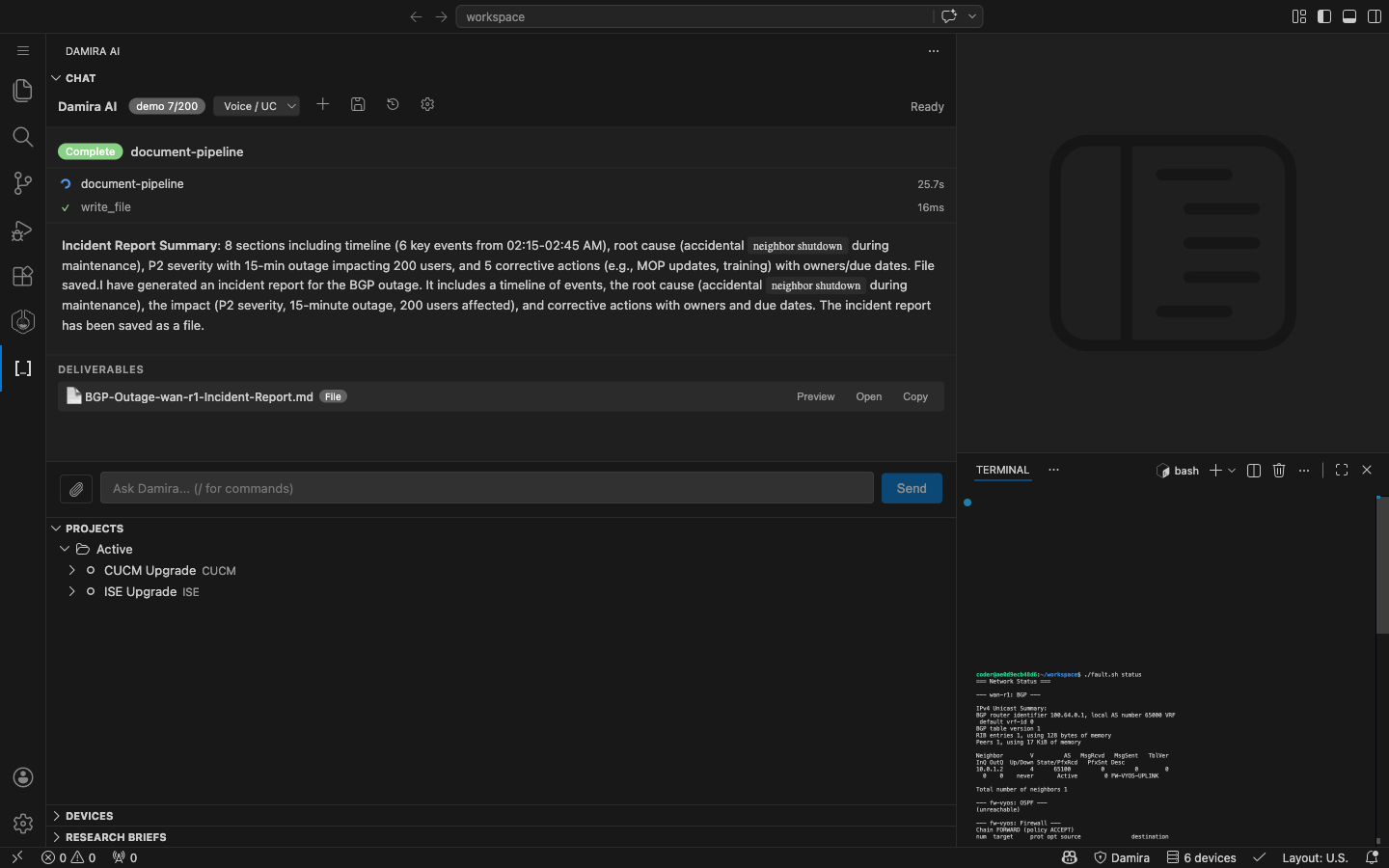
- Open the Damira AI chat panel in VS Code
- Open the terminal and check network health:
./fault.sh status - Inject a fault (e.g.,
./fault.sh bgp-down) - Ask Damira to diagnose the issue
- The agent identifies the problem and recommends the fix
Advisor mode: The agent recommends commands for you to run. Paste the output back and the agent analyzes it. Your data stays in your network.
Exercises
Beginner (5 min each)
Exercise 1: Explore the Network
Check each device from the terminal, then ask:
"I have 4 FRR routers and a VyOS firewall. Management IPs: wan-r1 (172.88.88.10), fw-vyos (172.88.88.15), core-r1 (172.88.88.11), access-r1 (172.88.88.13). Check BGP, OSPF, and firewall status on all devices."
The agent pings each device, confirms reachability, and guides you through the diagnostic commands for each router.
Exercise 2: BGP Peer Down
Inject the fault:
Ask Damira:
"Users can't reach the internet. Can you check BGP on wan-r1?"
The agent identifies the BGP neighbor in Idle (Admin) state — meaning it was manually shut down. It recommends no neighbor 10.0.1.2 shutdown to restore the session.
Follow-up: After fixing, ask "Verify the BGP session is established now" to test multi-turn context.
Reset: ./fault.sh reset
Exercise 3: Config Security Audit
Pull a router config and paste it:
"Audit this FRR config for security issues and missing hardening: [paste config]"
The agent identifies: no BGP MD5 authentication, no OSPF authentication, no logging configured, no prefix lists, no route maps, and no ACLs on VTY lines.
Intermediate (5 min each)
Exercise 4: OSPF Area Mismatch
"OSPF adjacency between core-r1 and access-r1 seems to be flapping. Can you diagnose?"
The agent checks OSPF neighbors on both sides, detects mismatched area IDs (Area 0 vs Area 1), and recommends correcting the area configuration.
Reset: ./fault.sh reset
Exercise 5: Firewall Blocking Traffic
"Users can ping their local gateway but nothing beyond it. Traffic seems to stop at the firewall."
The agent traces connectivity hop by hop, checks iptables on fw-vyos, finds the DROP rule in the FORWARD chain, and recommends removing it.
Reset: ./fault.sh reset
Exercise 6: NAT Broken
"Internal users can reach core routers but external sites are unreachable. Could be a NAT issue."
The agent checks NAT rules on fw-vyos, finds the empty POSTROUTING chain, identifies the missing masquerade rule, and recommends restoring it.
Reset: ./fault.sh reset
Exercise 7: Generate Router Config
"Generate an FRR config for a new access switch: hostname access-r2, OSPF Area 0, interface eth1 at 10.0.4.1/24 connecting to core-r1, interface eth2 at 192.168.2.1/24 for a second user VLAN, and basic security hardening."
The agent produces a complete FRR configuration with OSPF, interface addressing, logging, VTY access controls, passive interfaces on user-facing ports, and verification commands.
Exercise 8: Generate a MOP
"Generate a MOP for adding a backup eBGP peer to wan-r1: neighbor 10.0.1.5 remote-as 65200 for a secondary ISP uplink."
The agent may ask follow-up questions about the maintenance window, risk level, and rollback criteria before generating the full Method of Procedure as an interactive spreadsheet.
Exercise 9: Change Control Document
"Create a change control document for upgrading FRR from 10.2.1 to 10.3.0 across all routers in the lab."
The agent produces a CAB-ready document with change description, risk assessment, implementation steps per device, rollback procedure, and success criteria.
Advanced (10 min each)
Exercise 10: CVE Research + Upgrade Plan
"Research CVEs affecting FRR 10.2.x. What vulnerabilities exist and should we upgrade?"
The agent searches CVE databases (NVD), GitHub security advisories, FRR release notes, and vendor documentation. It compiles findings into a research brief with upgrade recommendations.
Follow-up: "Based on that research, create a prioritized upgrade timeline for our 4 routers."
Exercise 11: Network Assessment Spreadsheet
"Perform a full network health assessment of this lab. Check BGP, OSPF, firewall rules, NAT, and connectivity. Output as a spreadsheet."
The agent queries each device, compiles findings into an interactive spreadsheet with device inventory, protocol status, security findings by severity, and recommendations.
Fault Injection Commands
Device Access
Tips
- Provide context: Tell the agent your device IPs, vendor (FRR/VyOS), and what you're seeing. More context = better diagnosis.
- Paste command outputs: In advisor mode, paste the output of recommended commands back into chat for analysis.
- Multi-turn works: Reference previous findings in follow-up questions. The agent remembers your conversation.
- Reset between exercises: Run
./fault.sh resetbetween fault injection exercises to start clean.